
Self-Hosted AI Gateway for Unified LLM Access
Introduction
As a heavy AI user, I interact with over a dozen AI platforms daily through various coding agents: Germanna, CodeX, GitLab Copilot, Zhipu AI, MiniMax, Qwen, Volcano Ark, and more. Each platform provides API quotas, but managing them分散ly became a nightmare.
The problem wasn't having enough quota overall—it was the distribution. I'd hit rate limits on one platform mid-task while others sat underutilized. Switching between different base URLs, API keys, and authentication methods across my devices was tedious and error-prone.
My solution? Building a self-hosted LLM Gateway to unify all API keys, expose it to all my devices via Tailscale, and achieve intelligent routing, load balancing, and resource pooling.
Why New API?
I spent considerable time evaluating different gateway solutions. Here's what I considered:
| Solution | Characteristics | Why Not |
|---|---|---|
| LiteLLM | Python-based, feature-rich | Relatively heavy, requires Python environment |
| one-api | Go-based, most complete features | Too many commercial features, complex for personal use |
| uni-api | Lightweight, config-file only | Relatively simple functionality |
| New API | Fork of one-api with modern UI | ✅ Perfect for personal + lightweight commercial needs |
LiteLLM is excellent for Python-heavy workflows and has extensive provider support. However, it requires managing a Python environment and feels heavier than needed for my use case.
one-api is the most feature-complete option with a mature codebase. But it includes many commercial-oriented features I don't need, making the UI feel cluttered for personal use.
uni-api takes a minimalist approach with pure configuration files and no UI. While elegant, it lacks the visual analytics I wanted for tracking token usage across providers.
New API struck the right balance. It's a fork of one-api with a more modern interface, supports additional services like Midjourney, and provides complete token usage statistics and cost analytics—all while maintaining simple Docker deployment.
Key Benefits
Intelligent Routing
The gateway's intelligent routing is the killer feature for my workflow. When one platform hits rate limits, the gateway automatically switches to a backup provider without interrupting the coding agent workflow.
Here's how it works in practice: I configure multiple channels (provider connections) for the same logical model. When I send a request to claude-sonnet, the gateway routes it across my configured channels—Zhipu AI, MiniMax, Qwen, etc. If Zhipu returns a rate limit error, the gateway automatically retries with MiniMax, all within milliseconds.
This happens transparently. My coding agent never knows the difference—it just sees a successful response.
Load Balancing
Beyond failover, the gateway distributes concurrent requests across multiple platforms using weighted random selection. This prevents any single point of rate limiting from blocking tasks.
The weighting is configurable. I assign higher weights to providers with larger quotas or better pricing, ensuring optimal resource utilization.
Resource Pooling
This is where the real magic happens. All platform quotas merge into one "big pool". No more wasted unused quotas from any provider.
Before: Each platform was "almost enough" but often one ran out while others had plenty remaining. I'd constantly monitor dashboards, manually switching providers when one approached its limit.
After: All quotas work together, using whichever is cheaper or has available capacity. The gateway treats all my API keys as a single resource pool, "squeezing every token dry."
The cost optimization is significant. I can route traffic through whichever provider offers the best price for a given model, and the gateway handles the rest.
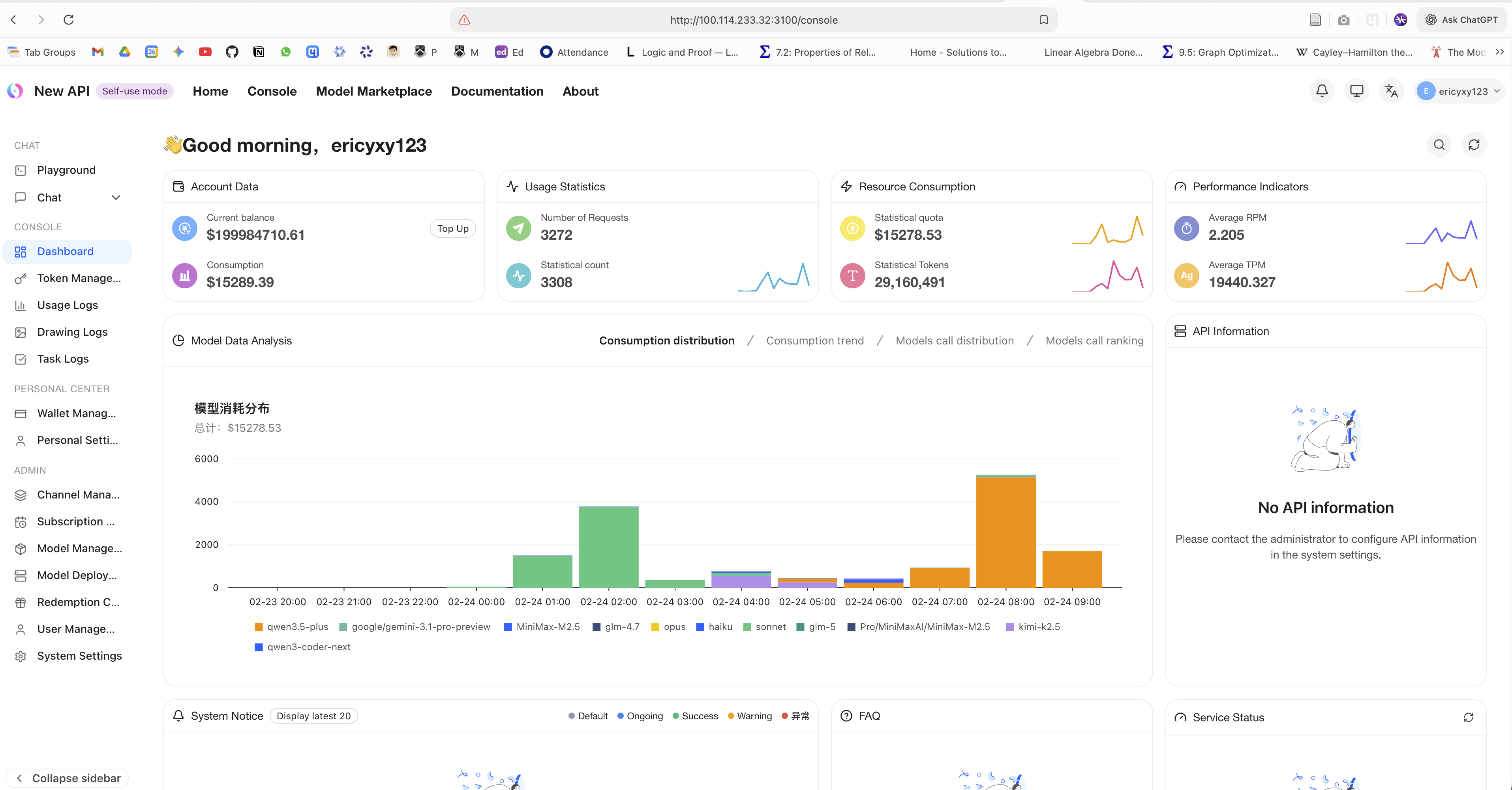
New API dashboard showing requests, token usage, and model consumption distribution from the pooled gateway setup.
Unified Access
From a client perspective, everything is beautifully simple: one base URL. Claude Code, Cursor, Cline—every tool points to http://100.100.1.100:3000/v1 (my gateway's Tailscale IP). Behind the scenes, I can switch model providers, adjust routing weights, or add new platforms without touching client configurations.
With Tailscale, all devices access the same gateway seamlessly. My MacBook, PC, and phone all use the same endpoint, regardless of where they are.
Architecture
System Overview
The architecture consists of three layers: clients, gateway, and providers.
Client Layer: All my coding agents and AI apps—Claude Code, Cursor, Cline/Roo Code on MacBook; VS Code + Copilot, Germanna on PC; Cherry Studio and other AI apps on mobile.
Gateway Layer: The New API server handles routing, load balancing, and analytics. PostgreSQL/SQLite stores usage data, while Redis provides caching for low-latency routing decisions.
Provider Layer: 10+ AI platforms including Zhipu, MiniMax, Qwen, Volcano Ark, Germanna, CodeX, GitLab Copilot, and more.
Request Flow
Understanding how a request flows through the system helps explain the magic happening behind the scenes:
- Client Request: Your coding agent sends a standard OpenAI-format request to the gateway.
- Routing: The router selects a channel based on weights, availability, and retry logic.
- Transformation: The transformer converts the request to the provider's expected format.
- Forwarding: The request goes to the actual provider API.
- Response Normalization: The response is converted back to OpenAI format.
- Return: Your agent receives the response, unaware of the complexity behind it.
Intelligent Routing Strategy
The routing strategy combines weighted random selection with automatic failover:
When a request for claude-sonnet arrives, it enters a channel pool containing three providers. The router performs weighted random selection—MiniMax gets 40% of traffic, while Zhipu and Qwen each get 30%. If the selected channel fails with a rate limit, the router automatically retries the next available channel.
Parameter Translation
Different LLM providers use different parameter names and formats. The gateway handles these translations transparently:
Common Parameter Mappings:
| Client Param | Zhipu/MiniMax | Anthropic | Gemini | Notes |
|---|---|---|---|---|
max_tokens | max_tokens | max_tokens | maxOutputTokens | Default values vary significantly |
temperature | temperature | temperature | temperature | Some models don't support 0 |
top_p | top_p | top_p | topP | Widely supported |
stream | stream | stream | Not supported | Streaming protocol differences |
tools | functions | tools | tools | Format incompatibilities |
The translation happens automatically. You send OpenAI-format requests, and the gateway figures out how to talk to each provider.
Tailscale Mesh Network
Tailscale creates a secure mesh network between all my devices without requiring complex networking setup:
Each device gets a Tailscale IP in the 100.100.1.x range. The gateway server (where New API runs) sits at 100.100.1.100. All other devices connect directly via P2P—no exit node required. This keeps latency low and bandwidth high.
Deployment Steps
Docker Compose Configuration
New API provides an official Docker Compose template. Here's the basic setup:
version: '3'
services:
  new-api:
    image: calciumion/new-api:latest
    container_name: new-api
    restart: always
    environment:
      - SESSION_SECRET=your_session_secret
      - SQL_DSN=/data/new-api.db
      - REDIS_CONN_STRING=redis://redis:6379
    volumes:
      - ./data:/data
    ports:
      - "3000:3000"
    depends_on:
      - redis

  redis:
    image: redis:alpine
    container_name: new-api-redis
    restart: always
    volumes:
      - ./redis-data:/data
Key Configuration Points:
SESSION_SECRET: Required for session management. Generate a random string for production.SQL_DSN: Database connection. Uses SQLite by default (/data/new-api.db), but you can switch to PostgreSQL for multi-instance deployments.REDIS_CONN_STRING: Redis for caching. Improves routing performance under load.
Deploy with:
docker-compose up -dTailscale Setup
Setting up Tailscale is straightforward:
- Install Tailscale on all devices (MacBook, PC, server, mobile)
- Log in with the same account on all devices
- Note the Tailscale IP of the gateway server device
- Configure firewall rules to allow incoming connections on port 3000 (or your custom port)
No exit node is needed since we're using P2P mesh networking. Tailscale handles NAT traversal automatically.
Adding API Channels
Once the gateway is running:
- Access the dashboard by navigating to
http://<gateway-tailscale-ip>:3000 - Create an admin account on first login
- Navigate to Channels → Add Channel
- Select provider type (OpenAI Compatible, Anthropic, etc.)
- Enter API key and base URL for each provider
- Configure model mappings to define which upstream models each channel provides
For model mappings, you can configure multiple channels to serve the same logical model. For instance, all three channels (Zhipu, MiniMax, Qwen) can serve claude-sonnet, enabling the intelligent routing described earlier.
Issues & Solutions
Tools / Function Calling Compatibility
This was the most significant issue I encountered during setup.
Problem Scenario: When intelligent routing maps a single model field (e.g., claude-sonnet) to multiple provider channels, different providers have varying support for tools / function_calling, causing requests from coding agents to fail on certain channels.
Coding agents like Cline and Roo Code rely heavily on function calling for file operations, terminal commands, and search functionality. When the gateway routes a request with tools to a provider that doesn't support the same format, the request fails.
Specific Issues:
| Issue Type | Description | Example |
|---|---|---|
| Format Incompatibility | OpenAI functions vs Anthropic tools | Parameter structure differences |
| Unsupported Parameters | tool_choice with auto/required options | Some models only support none |
| Response Parsing Differences | tool_calls return structure varies | JSON string vs parsed object |
| Default Value Differences | max_tokens defaults vary | Ollama 128 vs vLLM 16 |
Solutions:
For tool calling scenarios, use a fixed single provider. Configure your coding agent to use a dedicated model endpoint that maps to one reliable provider (e.g., only Zhipu or only MiniMax).
Configure different model routing rules in New API for different functionalities. Create separate logical models:
claude-sonnet-chat→ routed to multiple providers (chat-only, no tools)claude-sonnet-coding→ routed to single provider (supports tools)
Or: Create separate "coding" and "chat" routes. This is the approach I eventually adopted. All tool-calling requests go through a "coding" route with a fixed provider, while general chat requests use the pooled routing.
Tailscale Networking Notes
A few things to keep in mind:
- P2P mesh networking is used directly between devices, no exit node required. This keeps latency low.
- Ensure all devices can reach the gateway server device. If Tailscale falls back to relay mode (because direct P2P isn't possible), performance will suffer.
- Configure firewall/port forwarding as needed. The gateway server needs to accept incoming connections on its Tailscale IP.
Conclusion
Building a self-hosted AI Gateway transformed how I manage multiple AI platforms. The unified access, intelligent routing, and resource pooling eliminated the constant rate limit interruptions and wasted quotas.
The ROI was immediate. Within the first week, I stopped hitting rate limits during intensive coding sessions. The token analytics dashboard showed me which providers I was underutilizing, allowing me to rebalance my spending. And the peace of mind from not constantly monitoring quota usage? Priceless.
Who Should Consider This:
- Heavy AI users managing multiple platform API keys
- Developers experiencing frequent rate limits from single providers
- Anyone wanting centralized token usage analytics
- Teams needing shared AI infrastructure across devices
Who Might Skip It:
- Light users with a single provider
- Anyone comfortable with manual provider switching
- Those without multiple devices needing access
The setup requires some initial effort—an evening for deployment and configuration—but pays off immediately in workflow reliability and cost efficiency. For anyone in my situation (dozens of API keys, constant context-switching between providers), it's absolutely worth it.